


Bookmory - reading tracker
4.72.87K Reviews
App Specs
- Version
- 1.4.17
- Updated On
- License
- Free
- Downloads
- 1,000,000+
- Developer
- Tony soft
- Categories
- Books & Reference
- Platform
- Android, iOS
Screenshots

 Analysis by AppCompare
I think the best way to judge a reading tracker is to ask whether I would still use it after the novelty wears off. A book log can look satisfying on day one, but it only helps if recording a chapter or finishing a book feels easy enough to become a habit. Bookmory - reading tracker is built around that practical idea: it gives me a place to keep my reading history, make notes, and see patterns without turning reading itself into a competition.
That makes it a good fit for readers who switch between several books, forget where they left off, or want a record of what they have finished. It is less compelling if you only read occasionally and have no interest in logging titles, dates, or progress. For me, its value is not that it makes me read more by magic; it is that it reduces the small bits of mental bookkeeping around reading.
A routine that is easy to keep
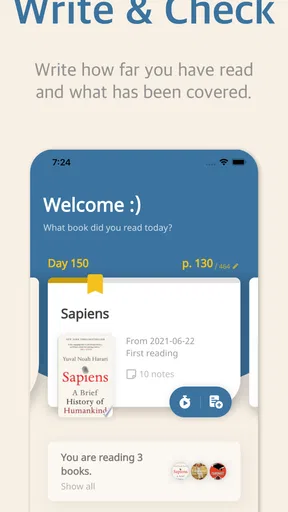
The most reliable way to use a tracker is to update it at a natural stopping point rather than trying to reconstruct a week of reading later. I would add a book when I start it, update the current page after a session when the number matters to me, and mark it finished while the ending is still fresh. That creates a useful record with little effort. If I miss an update, I can simply resume from the page I am on instead of treating the log as a project that has fallen behind.
For example, imagine reading a few chapters on the train, then switching to a different book at home. A quick progress update helps me remember which edition or reading copy I was using and where I paused. When I finish one, recording the end date and a short reaction gives me more to look back on than a bare title list. The trick is to keep notes concise: one memorable idea or a sentence about how the book felt is often more useful than trying to write a full review every time.
This is where a dedicated reading log differs from a general notes app. Notes can hold anything, but book details and progress are easy to lose among shopping lists, work reminders, and saved links. A tracker provides a more deliberate home for the reading habit. On the other hand, if you already maintain a tidy spreadsheet or enjoy writing longer reviews on a social reading site, moving everything may not be worth the effort. Bookmory works best when its structure saves you work rather than becoming another system to maintain.
Settings that shape the experience
I would make the display comfortable before building a large library. A theme or night mode can make checking a reading log less distracting in the evening, and lists give me a way to separate books by purpose instead of leaving everything in one long pile. For instance, I might keep a short list of books I want to borrow soon apart from titles I have already started. That distinction makes the app more useful when I am choosing my next read, not just looking back at completed ones.
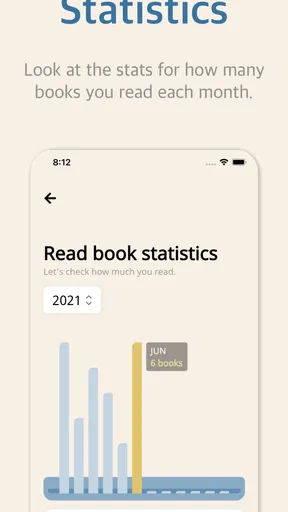
It is worth deciding what you actually want to measure before leaning on statistics. If a yearly goal motivates you, recording starts and finishes consistently can make the charts feel rewarding. If page counts and streak-like routines make reading feel like homework, I would use the log more lightly and ignore the numbers that do not help. A tracker should support the kind of reading life you want, whether that means finishing more books or simply remembering what you enjoyed.
Worth Reading Before You Choose

Flipboard Shows What News Apps Must Do Beyond the Feed

Switching to Android Auto Means Rethinking Your Driving Routine

Google Calendar Makes a Crowded Week Easier to Manage

Ludo King Makes the Most of the Minutes Between Plans

Baby Panda World Brings Quick Play to Modern Phones, but Its Game Library Feels Busy

ESPN’s Live Game View Makes Following Close Games Easier
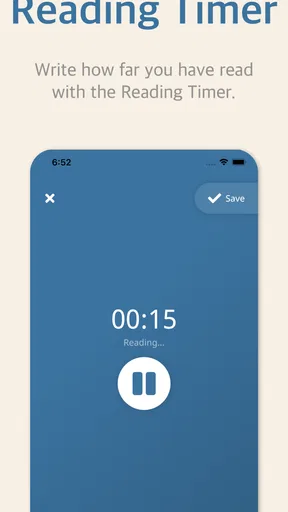
The timer and reminders can also be used selectively. A timer may help someone who wants to set aside a regular reading window or compare sessions over time, but it is not necessary for enjoying a novel. A reminder is most useful when attached to a realistic routine, such as reading during a lunch break, rather than an ambitious schedule that quickly becomes annoying. I would start with one gentle prompt, see whether it helps, and adjust instead of piling on notifications.
Where it fits among reading tools
Bookmory sits between a simple personal list and a more social book platform. A notebook or spreadsheet gives complete freedom, but I have to decide how to structure every entry and maintain the layout myself. A community-focused service may be better if discussion, public reviews, and discovering what friends are reading are the main attraction. Bookmory’s appeal is the combination of personal tracking, reading notes, and statistics in one app, with social features available for people who want to share.
That balance will not suit everyone. Readers who want a private, minimal checklist may find the extra tracking options unnecessary, while people who want a lively discussion space may prefer a platform where conversation is the main event. I would choose based on the habit I want to reinforce: a searchable record and progress log point toward Bookmory; long-form reviewing or community discovery may point elsewhere. You can also keep a simple external backup or export your reading data if you prefer not to have your entire history depend on one app.
Getting Started with Bookmory
Diving right in, the first thing I noticed about Bookmory is its clean and intuitive interface. It doesn’t bombard you with unnecessary options or flashy graphics, which is refreshing. It's all about the books here, and I love that. Setting up was a breeze. I simply downloaded the app from the store, and in no time, I was ready to log my first book.
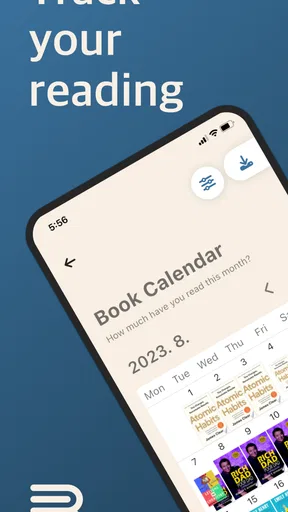
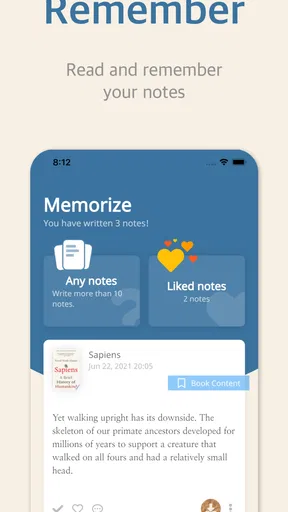
The app lets you add books by searching for them online or manually entering details. I found the search function pretty handy and accurate. It's like having a mini-library catalog at your fingertips. For those who love to track their reading habits meticulously, Bookmory provides fields for everything: start date, finish date, your current page, and even a place to jot down thoughts or notable quotes.
Features that Stand Out
One feature that instantly caught my attention is the detailed statistics section. It’s fascinating to see your reading patterns over time. You can view charts showing how many books or pages you’ve read in a month, and even discover your reading peak times. It’s a bit like having a Fitbit for your reading! If you’re someone who sets yearly reading goals, this feature will be your best friend.
Another cool aspect is the reading timer. You can time your reading sessions to better understand your pace. It might sound a bit geeky, but I found it quite motivating. Plus, there's a nifty feature that lets you set reminders to read, helping you stay on track with your goals.
Community and Sharing
One of the things I appreciate about Bookmory is its social aspect. You can connect with friends to see what they’re reading, share your thoughts on books, and even get recommendations. It’s like having a virtual book club right in your pocket. Plus, the app allows you to export your reading data, which is a nice touch for those who like to keep a backup or switch devices often.
For those who love sharing their reading journey on social media, Bookmory makes it simple to post updates directly from the app. You can flaunt your latest read or your impressive reading stats with just a few taps.
Customization and Personalization
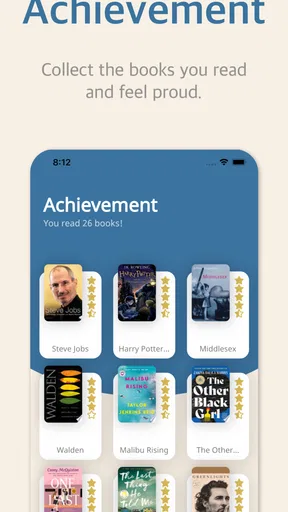
Personalization is key, and Bookmory doesn’t disappoint. You can customize your reading experience by changing themes to match your mood or using the night mode for those late-night reading binges. The app also allows you to organize your books into categories or lists, which is fantastic for someone like me who likes to keep things tidy and organized.
A Few Things to Note
While I’m quite smitten with Bookmory, no app is without its quirks. I noticed that the app occasionally has hiccups when syncing data across devices. It’s not a deal-breaker, but something to keep in mind if you’re using multiple devices. Also, some features are locked behind a premium version, like additional themes and advanced statistics. However, the basic version is robust enough for most readers.
Bookmory is a free Books & Reference app from Tony soft, rated for Everyone and available on Android 7.0 or later. It was released on May 31, 2020, and its current version is 1.3.74. Its 4.8 average from around 75,000 ratings and more than 1 million installs suggest that plenty of readers find this kind of organized log useful. Optional in-app purchases range from $2.99 to $79.99 per item, so I would try the free experience first and only consider paying if a particular extra matters to my routine.
One practical limitation is that detailed records depend on how consistently I enter them. If I update pages irregularly, charts become less representative of my real reading, and a timer cannot account for every distracted or interrupted session. Search is convenient, but a book that is hard to find can require manual entry, which takes more attention than adding a familiar title from results. I would keep the essential details accurate and avoid spending time perfecting every field.
There is also a real trade-off in using reminders and statistics: they can make a reading habit visible, but they can turn leisure into another performance target. I would use a reminder to protect a small reading window, not to scold myself for missing one. Likewise, monthly totals can be interesting without being a verdict on whether I read well. If I am reading slowly, switching between books, or enjoying a dense title, the log should reflect that rather than pressure me to chase a higher count.
For someone who reads both print and digital books, the useful question is not whether every session can be measured perfectly, but whether keeping the same record for both formats is worthwhile. A shared log can give a clearer picture of what I am reading overall, while manual page updates may feel fussy if my reading app already tracks digital progress. I would record the title and a meaningful milestone in Bookmory, then leave precise session tracking for the occasions when it genuinely helps.
Small habits that make the log more useful
Experienced users can keep the workflow repeatable without turning it into a chore. I would add a title as soon as I decide to read it, then use lists to distinguish “next up” from “in progress.” That avoids a common muddle: a long want-to-read list can otherwise make it hard to spot the book I am actually carrying. After finishing, a brief note written in my own words is a better memory aid than a string of copied quotations; it gives me a quick reminder of why the book mattered to me.
For books I read in short bursts, I would update the current page only when I stop for the day or change devices. That keeps the record useful without interrupting every session to tap through the app. For a book club selection, I might note questions or a passage to bring up later, then use the social side only if my friends are also using it. This makes the same app serve a private reading diary and a shared conversation without requiring every entry to be public.
If I am moving from another tracker, I would not try to recreate every old note before starting. I would first add books I am currently reading and a small selection of recent finishes, then bring in older history only if I want those statistics or notes in one place. Exporting can offer a safety net, but I would still check that the resulting record contains the information I care about before relying on it as my only archive. This is especially sensible for anyone who changes devices or likes to keep personal records outside an app.
Who will get the most from it
I can see Bookmory helping a reader who has several books on the go, sets personal reading goals, or likes revisiting notes months later. It is also handy for someone who borrows books and wants to remember what is already read before choosing another title. A realistic everyday routine could be to add a library book before leaving home, update its page after an evening reading session, and jot down one thought before returning it. Those small entries build a record that is more useful than relying on memory.
I would skip it if I dislike maintaining lists, rarely forget what I have read, or want my reading app to focus mainly on purchasing, borrowing, or displaying the text itself. It is a companion for organizing reading, not a replacement for an ebook reader or library service. A paper journal may also be more satisfying if the act of handwriting notes is part of the pleasure. The right choice depends on whether I want structure and searchable entries more than a completely free-form record.
As a catalog grows, I would keep the organization simple enough to use. A few purpose-based lists are easier to maintain than creating a new category for every mood or genre. I would also treat the statistics as a reflection of what I chose to log, not an exact account of every minute spent reading. That distinction matters: the app can make patterns easier to notice, but my entries are still the source of those patterns.
Overall, Bookmory is most convincing when I use it as a light, dependable record rather than a demanding productivity system. Its search, manual entry, notes, lists, timer, reminders, and reading statistics give different kinds of readers room to shape a routine, while the free version is a sensible place to see whether that routine sticks. I would recommend it to someone who wants a personal reading history with a little more structure than a notes app, while being candid that sync hiccups and premium extras may matter to people who rely on multiple devices or want every customization. If the goal is to remember books and make reading feel more intentional, it is worth trying; if tracking itself feels like work, a simple list may be the better companion.
Pros
- Intuitive interface for easy tracking.
- Syncs across multiple devices seamlessly.
- Customizable reading goals and reminders.
- Supports a wide range of formats.
- Insightful reading statistics and graphs.
Cons
- Limited social sharing features.
- Ads can be intrusive in free version.
- Occasional syncing delays reported.
- Limited audiobook tracking support.
- Some features locked behind paywall.
FAQs for Bookmory - reading tracker
What features does Bookmory offer for tracking my reading habits?
Bookmory provides a comprehensive set of features for avid readers. You can log your reading sessions, track your progress with insightful statistics, and set personal reading goals. The app also allows you to create notes and reviews for each book, making it easier to remember your thoughts and recommendations.
Is Bookmory suitable for all types of readers?
Yes, Bookmory is designed to cater to a wide range of readers, from casual readers to book enthusiasts. Whether you read occasionally or have a large library to manage, the app’s customizable features, such as reading goals and session logs, can be tailored to fit your specific reading habits and preferences.
Can I sync my reading data across multiple devices?
Currently, Bookmory allows you to back up your reading data to the cloud, which can be accessed from multiple devices. This ensures that your reading progress and notes are secure and up-to-date, regardless of which device you are using to access the app.
Does Bookmory support importing or exporting book lists?
Yes, Bookmory supports both importing and exporting book lists. You can import your existing book list from other platforms using compatible formats, and export your data for backup or sharing purposes. This feature is particularly useful for readers who want to transition smoothly to Bookmory from other reading apps.
Is there a cost associated with using Bookmory?
Bookmory offers a free version with basic features. However, for users seeking advanced functionalities like detailed statistics, premium themes, and ad-free usage, there is a premium version available via in-app purchase. This allows users to enhance their reading experience according to their needs.


